I’ve previously led and managed software dev teams.
Using AI is like that but there’s no large team and no one reads the code.
I haven’t written any code personally in 4 months but I’ve caused the creation of thousands of lines of code, including in languages I don’t know. For 15+ years before that I handcrafted every line of java / kdb+q / bat / bash that I wrote and agonized over failure cases, testing and formatting. My entire workflow and every hard earned skill I spent years perfecting now needs to be reassessed and to be honest, it’s pretty damn exciting. I’ve learnt a lot over the past few months and I want to share some with you.
First comes Acceptance
- You won’t be writing the code.
- You won’t be reading most of the code.
- You will have to find a way to review the outcomes (good and bad) and to ensure reliability.
- Your goal is to design the factory that generates the code.
If you don’t accept that AI can write good code or that it’s the future you should stop now. If you’ve used code assist, AI to write full files, multiple simultaneous AIs and are wondering what’s next, this is the next small step.
Historically
Historically teams optimized for long term velocity by sharing skills and knowledge by planning and reviewing code together. The most critical parts that a junior could learn was what needed to be done, how to implement it, why and what was and was not a good solution to achieve the overall goal. Sad to say, a lot of how we traditionally shared and developed those skills should now be thrown away.
(I have no idea what the solution will be for juniors but one good mid to senior engineer can now outpace a whole team and I think they should be one-person teams to move fast. Maybe everything gets broken down to one man teams. I just don’t currently see how or why to scale to large dev teams right now Aug 2026)
The Software Factory
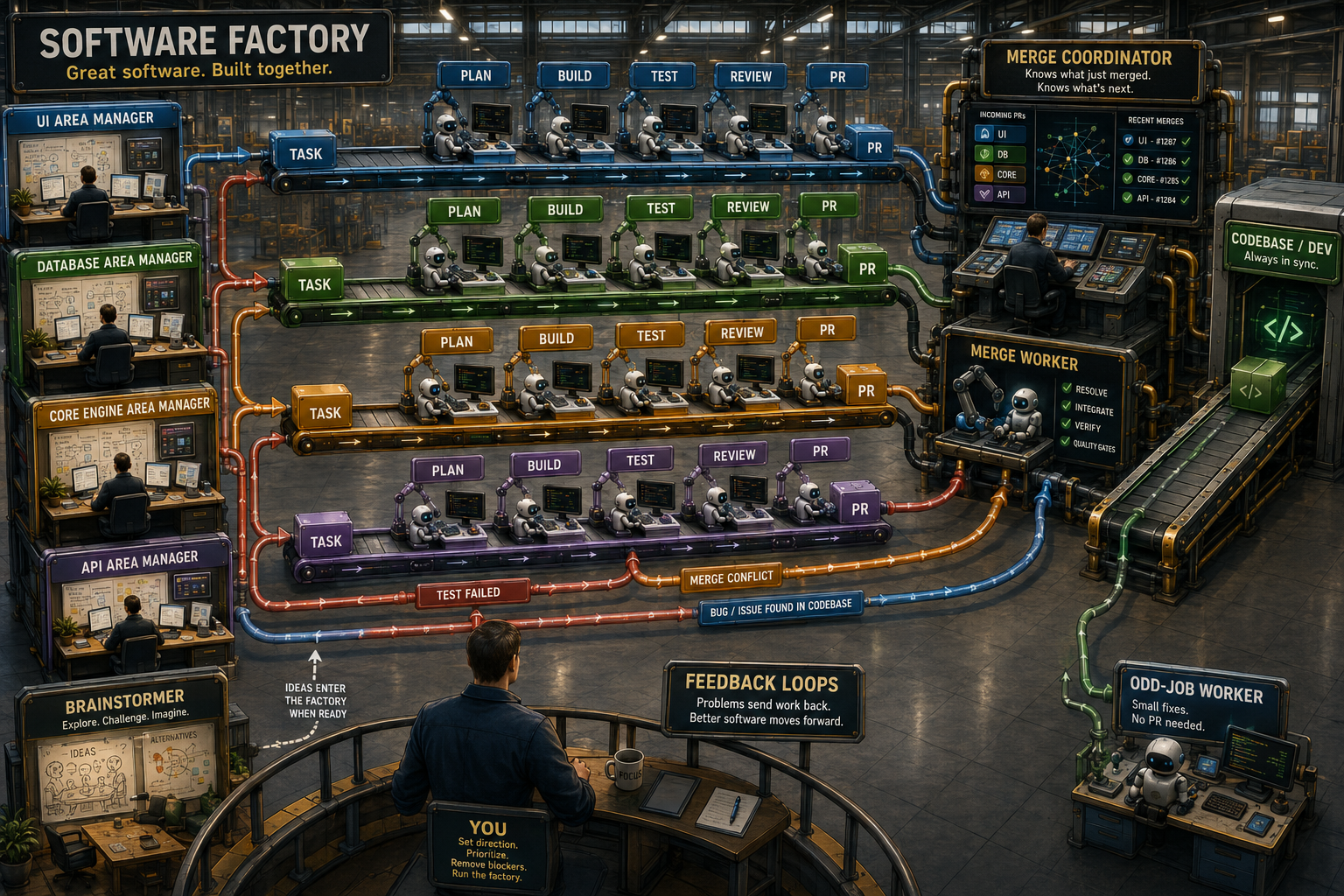
OK So what does this new world look like. At any one time you have 3-6 terminals open:
- The Merge Coordinator Tab – Their sole purpose is to use a background worker to merge code. They have the context of what just got merged, what is about to merge so if there is overlap they have some context to fix it. They should not get hands on in merging code beyond a few small <10 line edits, that’s the individual mergers job.
- The Task-Area Manager(s) – Your software should be modular and broken up into separable areas. When working in one area e.g. UI e.g. Database Access layer , one tab i.e. one AI manager should be dedicated to that area. Their job is to have overall context of that area and to draw up requirements, scopes, plans, targets that serve as the launching point for one PR. That task and that one PR will be assigned to a background-PR-worker.
(See the previous post on evolution-goals-safeguards to see how you might optimize them.) - The Odd-Job Worker – One tab is for small jobs that don’t justify a PR. Used infrequently but handy when one of your workers spots a bug.
- The big picture brain-stormer – Occasionally you won’t have a clear idea of what needs done or even what the goal should be. Ask the AI. Force it to give you 3-4 ideas. Even if these are terrible, it may kickstart your thinking, or ask it to tear apart your ideas. You don’t want these ideas in other tabs or workers as it would waste context and end up confusing them. They should only see your solidified ideas or plans so they have clear goals.
The above is really about maintaining context. You will have to re-weight what a PR is worth compared to your historical behavior. A PR is only worth as many tokens as it costs you, the amount of context you sunk into it that isn’t easily repeated.
Artifacts
The workers above should be operating from and feeding back into a number of key documents. To give you some idea of my various documents:
- Plan.md – Every worker appends a line of work done. Every time they notice work that will need done, they can add a few lines.
- Architecture.md – Have you made a major decision that will affect all future work, record it in architecture.md, record the reasons why. This will be the steering ideas that affect workers over a longer time period.
- ADRs – Generated from brainstorming sessions to record what all went into the decision.
Repeatable Approaches from Direct Examples
- User Example Code as Targets – Everything that you can make be code, is testable and reusable, so you want everything to be runnable code. Traditionally some languages did this well by running all examples on their website as code, seeing what failed and that was the examples that need updated. Now I sometimes go the reverse direction. AI is really good at writing docs, this presents two opportunities:
- Make it write tests in doc format and test them.
- Within the code, run code that generates the docs. For example if you want your tool to support 15 different forms of input, generate a table that lists the 15 forms and generate the percentage compatible you are with each. That table then generates directly into your docs. The docs can’t go stale as they are directly generated by your test cases. If someone adds to your test suite, it should show up in your docs.
- If you are providing any form of programmable tool, your target user is now AI, not a human.
Programming language = your target user is AI.
Database = your target user is AI.
REST API = your target user is AI.
If you are using AI for everything, eventually others will be too. - Great news your target user is AI.
Run experiments against various AIs and models to test how good your software is.
If AI is the target user, testing how easy your software is to use becomes simple. Create 5-10 tasks, assign them to different AIs and measure the outcomes. If your tool got more user-friendly, you should be able to see it. Previously you had to watch users and gather stats, now you can run the same experiment every 5 minutes.
Code is cheap. Context, Review and Verification are expensive.
Hopefully I’ve conveyed at least a vague outline of the AI Software Factory.
If you’ve progressed near to this, you now know that code is cheap, it’s the context, review and verification that we must now optimize for. I’ll hopefully dig into that and more in future blog posts.
Good luck building your factory


